
As the name implies, unallocated space is a type of disk space that does not belong to any partition. Besides creating new partitions, unallocated space can be merged into another partition on the same disk. When the system C: drive is getting full, many people want to shrink a partition and add unallocated space to the C drive. If you want to do this in Windows Server 2012 Disk Management, you'll be disappointed. This is because it cannot move unallocated space or add it to a non-adjacent partition. To add unallocated space to the C drive in Windows 2012 server, you need safe disk partition software.
Can't Add/Merge Unallocated Space to C Drive in Disk Management
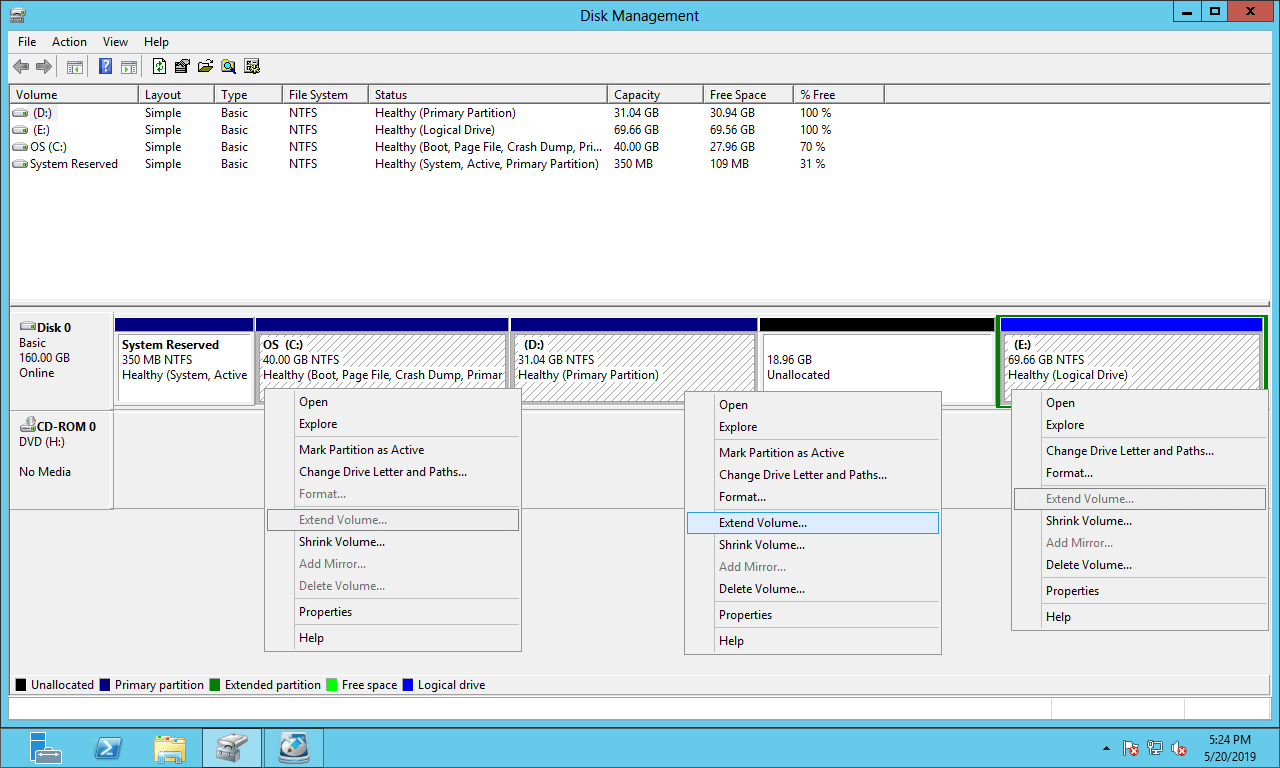
Windows Server 2012 has Shrink Volume and Extend Volume functions in the built-in Disk Management tool. But it cannot extend a partition by shrinking another one. Many people have shrunk the D drive successfully but cannot add the unallocated space to the C drive with Server 2012 Disk Management. This is because:
- The Shrink Volume function can only generate unallocated space on the right side of a shrunk partition.
- Extend Volume can only add unallocated space to the contiguous partition on the left.
When shrinking a partition, Disk Management only gives you an option to enter an amount of space to shrink; you cannot specify the position to generate the unallocated space.
As shown in the screenshot, unallocated space cannot be added to the C or E drive, because the C drive is non-adjacent and E is on the right side.
To add this unallocated space to the C drive, you need NIUBI Partition Editor to move partition D to the right and make the unallocated space adjacent to the C drive in advance.
How to Add Unallocated Space to C Drive in Windows Server 2012
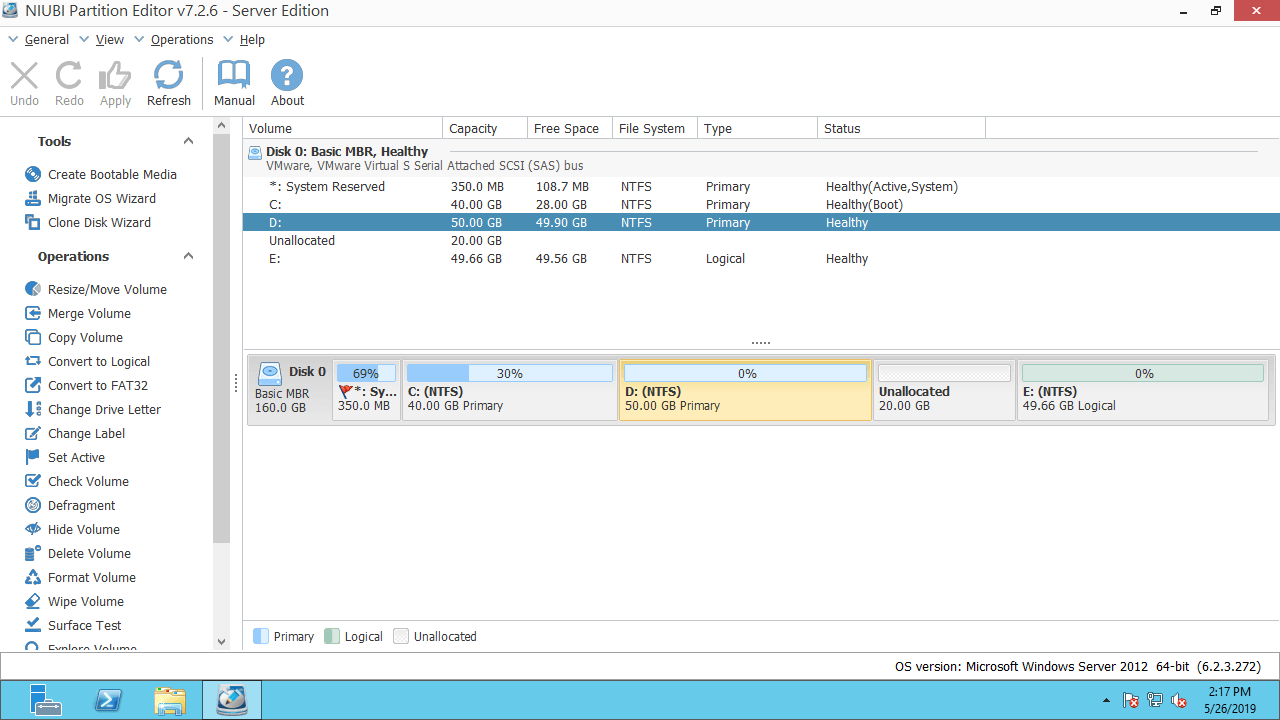
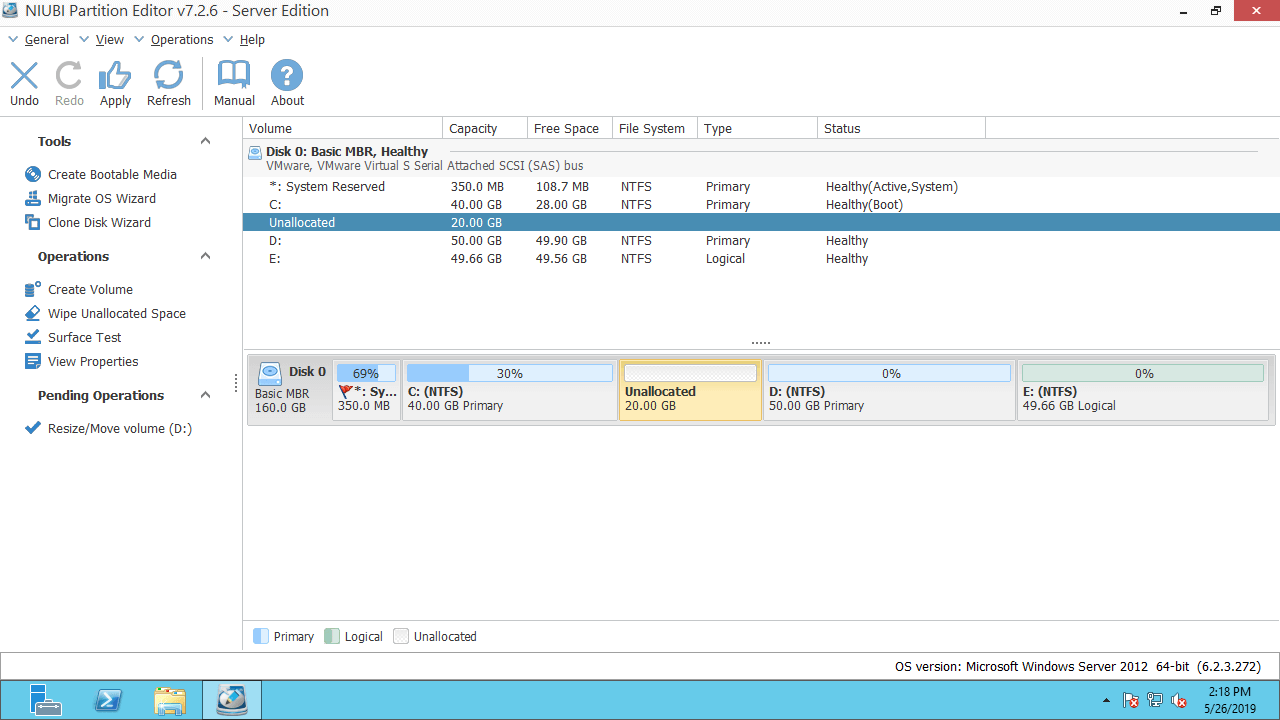
Download NIUBI Partition Editor and you'll see the main window with disk partition layout and detailed information of each partition. Available operations are listed on the left panel and can also be accessed by right-clicking. In the example below, there is 20GB of unallocated space that was shrunk from the D drive using Disk Management.
How to add unallocated space to C drive in Windows Server 2012 R2 with NIUBI:
Step 1: Right click drive D: and select "Resize/Move Volume", put the mouse pointer in the middle of D drive and drag it to the right in the pop-up window:
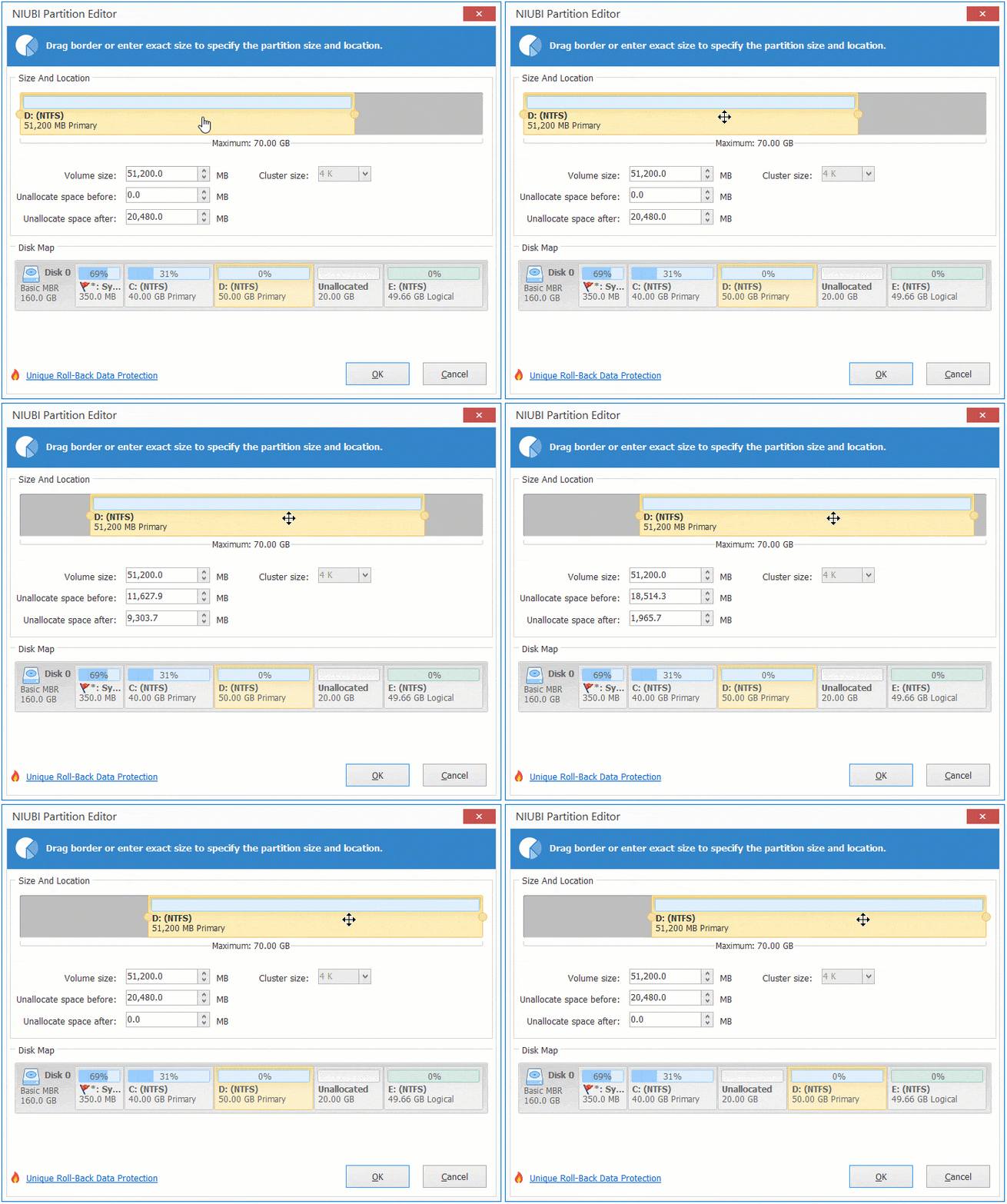
Then, the D drive is moved to the right, and the unallocated space is moved to the left side.
Step 2: Right click drive C: and select "Resize/Move Volume" again, drag the right border to the right in the pop-up window.
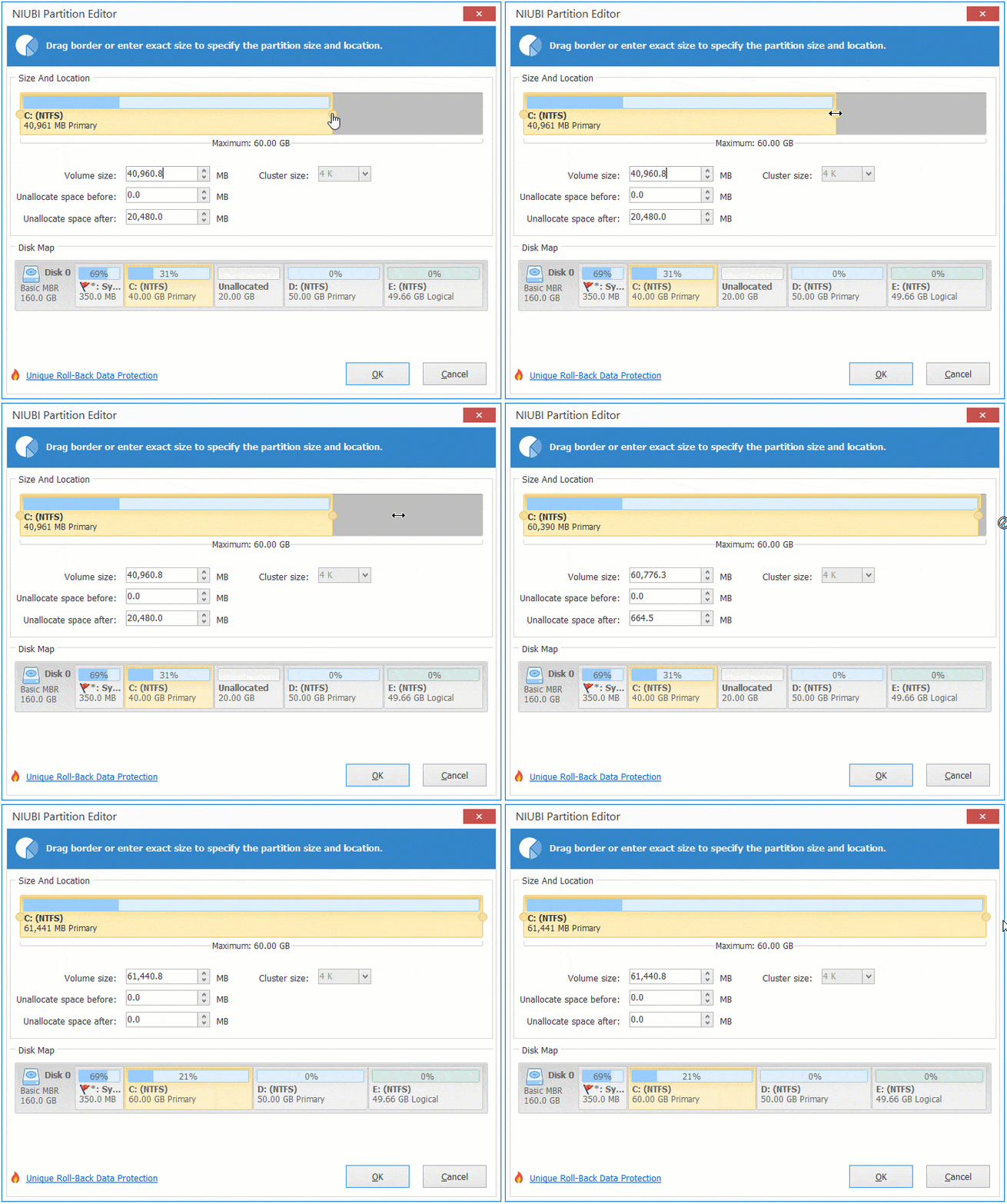
Then the unallocated space is added into the C: drive.
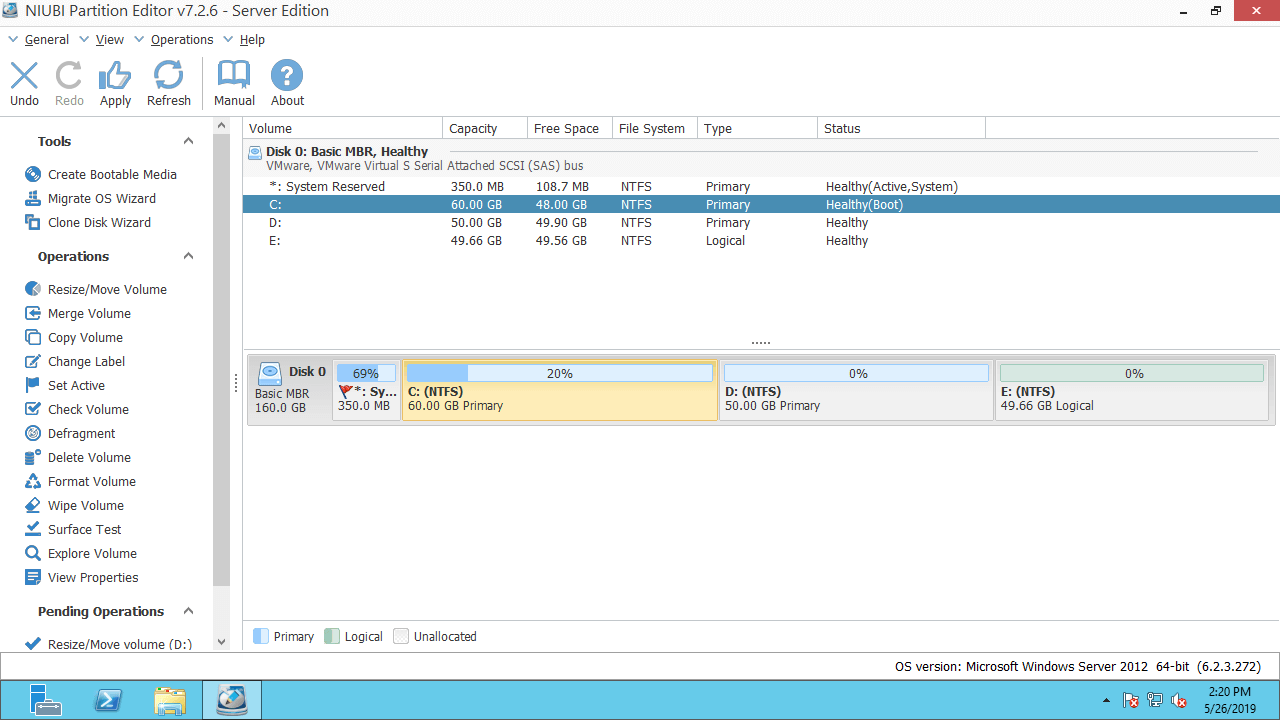
Step 3: Click "Apply" on the top left to take effect.
Video guide to move and add unallocated space to C drive in Windows 2012 Server:
Add Unallocated Space to System C Drive with Another Disk
On a few servers, there is only a C drive on the system disk, or there is not enough unused space in other volumes on the same disk. Some people want to add unallocated space to the C: drive from a different disk. No software can do this, because the size of a physical disk is fixed; a 500GB disk cannot be decreased to 450GB or increased to 550GB.
In this situation, you can clone disk to a larger one with NIUBI Partition Editor. The extra disk space will be shown as unallocated at the end of the disk, which you can then add to the C drive (and other data volumes).
How to add more space to C: drive in Windows Server 2012 by cloning disk:
In Summary
To move or add unallocated space to the C drive in Windows Server 2012 R2, Disk Management cannot help you. You need third-party software to accomplish this task. Better than other tools, NIUBI Partition Editor is much safer and faster because of its innovative technologies:
- 1 Second Rollback - automatically reverts disk partitions to their previous state instantly if any error is detected.
- Virtual Mode - all operations will be listed as pending for preview, and real disk partitions won't be changed until you click Apply to confirm.
- Cancel-at-will - cancel incorrect but ongoing operations without causing damage.
- Hot Clone - clone disk partitions without server interruption; you may clone the system disk before any operations or regularly as a backup.
- Advanced file-moving algorithm - resize and move partitions 30% to 300% faster.
Besides moving and merging unallocated space in Windows Server 2012/2016/2019/2022/2025 and previous Server 2003/2008, NIUBI Partition Editor helps you perform many other disk partition management and modification operations.
 © 2009 - NIUBI Technology All Rights Reserved. |